Honda CR-V Adaptive Cruise Control: How to Use It Safely
Honda CR-V Adaptive Cruise Control (ACC) holds a speed you set and automatically slows down, and with Low-Speed Follow even stops, to keep a chosen gap behind the vehicle ahead. To use it, press the cruise on/off (MAIN) button, push the -/SET switch at the speed you want, then pick a following distance with the interval button. It is standard on every CR-V since 2020, and on 2017–2019 models it came on the EX and higher trims.
Using it well is mostly a matter of knowing its limits. This guide covers the controls, the gap settings, what happens in stop-and-go traffic, and the situations where you should switch it off and drive yourself.

Which CR-Vs Have Adaptive Cruise Control?
ACC is part of Honda Sensing. Every version on the CR-V includes Low-Speed Follow, which means it can bring the vehicle to a stop behind traffic.
| Model years | ACC with Low-Speed Follow | Related features |
|---|---|---|
| 2016 and earlier | Not offered (conventional cruise only) | — |
| 2017–2019 | EX, EX-L, Touring (not LX) | Lane Keeping Assist System |
| 2020–2022 | Standard on all trims | Lane Keeping Assist System |
| 2023–2026 | Standard on all trims | LKAS plus Traffic Jam Assist (lane support below 45 mph) |
For a rundown of every other system in the suite, see our guide to Honda Sensing on the CR-V.
The Controls
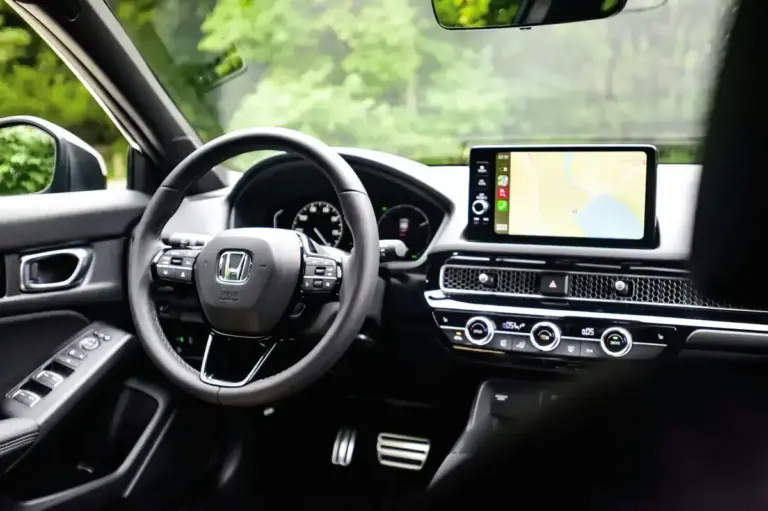
The ACC buttons are on the right-hand spoke of the steering wheel. Labels vary slightly by generation, but the functions are the same:
- MAIN (or the ACC on/off button): switches the system on and off. A cruise indicator lights up on the driver display when it is ready.
- RES/+ and -/SET: a rocker or pair of switches. Push to set the current speed, then push up or down to raise or lower it. A short press changes the speed in small steps, and holding the switch changes it in larger steps.
- Interval button: marked with a car and distance bars. Each press cycles through the following-distance settings, shown as bars behind a car icon on the display.
- CANCEL: turns off the current set speed without switching the system off, so you can resume later.
How to Use Adaptive Cruise Control Step by Step
- Pick the right road. Honda’s manuals say to use ACC with Low-Speed Follow on expressways and freeways in good road and weather conditions.
- Turn the system on. Press MAIN (or the ACC on/off button). Check that the ACC indicator appears on the display.
- Set your speed. At the speed you want, take your feet off the pedals and press -/SET. On recent models, if you set ACC while moving below about 25 mph, the set speed defaults to about 25 mph.
- Choose a following interval. Press the interval button until the display shows the gap you want. On a dry highway, a longer gap leaves more time to react and smooths out the braking.
- Adjust as you drive. Use RES/+ or -/SET to change the speed. When a slower vehicle is detected ahead, the vehicle icon appears and ACC slows the CR-V to keep the gap.
- Override when needed. Pressing the accelerator speeds you up temporarily. ACC takes over again when you lift off. Pressing the brake cancels ACC.
- Resume after cancelling. Press RES/+ to go back to the previous set speed, if the system is still on and conditions allow.
- Turn it off. Press MAIN (or the on/off button). The stored set speed is cleared.
Stop-and-Go Traffic: How Low-Speed Follow Works
When the vehicle ahead slows to a stop, ACC with Low-Speed Follow brings the CR-V to a stop behind it and shows a stopped message on the display. When traffic moves off again, press RES/+ or tap the accelerator to resume. The CR-V then accelerates back toward your set speed while keeping the gap.
Some details from Honda’s current owner’s manuals are worth knowing:
- If the vehicle stays stopped for an extended period (around 10 minutes in recent manuals), the driver’s seat belt is unfastened, or the engine is turned off, the electric parking brake may be applied automatically.
- Never get out of a vehicle that ACC has brought to a stop. The system can release and the vehicle can move without your control. Shift to Park first.
- On 2023 and newer models, Traffic Jam Assist adds lane-keeping steering support at speeds below 45 mph, which makes long traffic jams less tiring. You still have to steer, watch the road and be ready to brake.
When Not to Use Adaptive Cruise Control
ACC relies on a front radar and a windshield camera. Honda lists many conditions where it may not detect vehicles correctly or may cancel by itself. In practice, switch it off or do not use it in these situations:
- Bad weather: heavy rain, fog, snow or slush, and roads that are wet, icy or slippery. Cruise control of any kind is a poor idea on slick roads.
- Busy or complex roads: city streets, frequent lane changes, sharp curves, toll plazas, parking lots and drive-throughs.
- Steep or rolling hills: the CR-V may exceed the set speed downhill, and the sensors may lose the vehicle ahead over a crest.
- Hard-to-detect road users: motorcycles, bicycles, pedestrians, animals and vehicles that cut in sharply.
- Odd vehicles ahead: trucks with high ground clearance or unusual shapes, or loads hanging off the back.
- Blocked sensors: snow, ice or mud on the front grille area or the windshield in front of the camera.
- Towing or heavy loads: the system’s braking is limited. Check the manual before you use ACC when towing or with a heavy load. Our CR-V towing and load performance article covers the weight limits.
ACC also has limited braking power. It is not designed to stop for a vehicle that brakes hard in front of you or for a stopped vehicle that appears suddenly. That is the job of the Collision Mitigation Braking System, and above all of the driver.
Tips for Smoother, Safer Use
- Start with a longer gap. It gives you more reaction time and makes the speed changes less abrupt. Shorten it only in heavy traffic where other drivers keep cutting in.
- Keep your foot near the brake in dense traffic, and expect to take over when lanes merge.
- Watch the vehicle icon. If it disappears while there is clearly a vehicle ahead, the system has lost it. Be ready to brake.
- Use conventional cruise on empty roads if you prefer. Recent Honda manuals let you switch between ACC and regular cruise by holding the interval button for about a second while no speed is set. Regular cruise does not keep a gap.
- Expect slower acceleration in Econ mode. ACC takes longer to get back to the set speed in Econ mode.
On long trips, ACC combined with lane keeping noticeably reduces fatigue. Our look at the CR-V’s highway cruising and long-trip comfort covers the rest of the experience.
You Are Still the Driver
Adaptive cruise control is a driver-assist feature, not autopilot. Keep your hands on the wheel and your eyes on the road, stay ready to brake at any moment, and follow local traffic laws on following distance. You remain fully responsible for the vehicle. Before you rely on ACC, read the Adaptive Cruise Control section of the owner’s manual for your model year, because the controls and limits differ slightly between generations.
FAQ
Does the Honda CR-V adaptive cruise control stop the car?
Yes. With Low-Speed Follow, ACC can bring the CR-V to a full stop behind a stopped vehicle. To move off again, press RES/+ or the accelerator. Its braking is limited, so you must still brake yourself for sudden stops.
Why does my CR-V adaptive cruise control keep turning off?
It cancels automatically when the sensors cannot see well (rain, snow, a dirty grille or windshield), when the tires slip, when VSA, ABS or CMBS activate, or when you apply the parking brake. Clean the sensor areas and check for warning messages.
What is the minimum speed for CR-V adaptive cruise control?
With Low-Speed Follow, it keeps working down to a stop behind a detected vehicle. When you set it while moving slowly, recent models set the speed to about 25 mph.
Can I use adaptive cruise control in the rain?
Honda advises using it only in good weather. In light rain it may work, but heavy rain can block the sensors, and cruise control on wet roads makes it harder to react to hydroplaning.
Conclusion
CR-V adaptive cruise control is simple to run: MAIN, SET, choose a gap, and let the system handle speed on the highway. It is most useful on open freeways and in slow traffic jams, and least useful in bad weather or on busy local roads. Learn the controls, start with a long gap, and stay ready to take over.