Honda CR-V Remote Start: How It Works and How to Use It
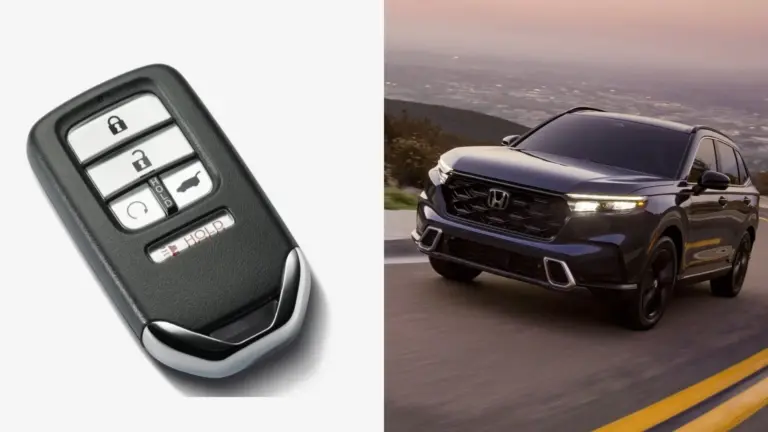
To remote start a Honda CR-V, stand within about 100 feet of the vehicle, press LOCK on the key fob, then press and hold the ENGINE START button (the circular-arrow button) for at least one second. The engine starts, the climate control begins working toward 72°F, and the CR-V stays locked until you get in with the fob. Factory remote start has been offered on US CR-Vs since 2017, but not on every trim in every year.
This guide covers the practical side: which trims have it, exactly what happens after you press the button, why it sometimes refuses to start, and how to use it safely in hot and cold weather.

Which CR-V Trims Have Remote Start?
Honda’s own feature guides show how availability has changed. If you are not sure about a used vehicle, look at the fob: a remote-start CR-V fob has a separate button with a circular arrow on it.
| Model years | Key fob remote start | Smartphone remote start |
|---|---|---|
| 2016 and earlier | Not offered from the factory | No |
| 2017–2020 | EX and above (not LX) | No |
| 2021–2022 | Special Edition and above (not LX) | No |
| 2023–2025 | Listed without a trim restriction; Honda publishes LX how-to material for it | Sport Touring Hybrid with a HondaLink subscription |
Before buying a 2023 or newer CR-V, confirm on the window sticker or with the seller that the fob has the remote start button. A replacement or aftermarket fob may not include it. Our earlier Honda CR-V remote start guide also covers aftermarket remote-start kits for models that never had it.
How Remote Start Works
The fob sends a radio signal to the CR-V’s immobilizer and keyless system. The vehicle checks that it is safe to start, cranks the engine and switches on the automatic climate control. It does not unlock the doors or let anyone drive off. The steering and shifter stay locked until a registered fob is inside and the driver presses the brake and the ENGINE START/STOP button.
Honda’s guides say the engine runs for about 10 minutes after a remote start and then switches off by itself if no one gets in. That is usually enough to clear frost from the windshield or take the edge off a hot cabin.
What the Climate System Does
The automatic climate control works toward 72°F inside, heating on cold days and cooling on hot ones. On cold days the defroster helps clear the glass. On Sport Touring Hybrid models with the HondaLink app, you can also set the climate output to low, medium or high from the phone. If your CR-V has heated seats or a heated steering wheel, check your owner’s manual for whether they switch on automatically during a remote start, because that varies by model year.
How to Remote Start Your CR-V with the Key Fob
- Make sure the CR-V is in Park, the doors, tailgate and hood are closed, and you are within about 100 feet with a clear line of sight if possible.
- Press the LOCK button on the fob once. The doors lock and the lights flash.
- Within a few seconds, press and hold the ENGINE START button (circular arrow) for at least one second.
- Watch for the turn signals to flash and listen for the engine. The climate control starts automatically.
- When you reach the vehicle, unlock it and get in as usual with the fob. The engine keeps running.
- To drive, press the brake pedal and press the ENGINE START/STOP button once. The instruments light up and the CR-V is ready.
How to Stop a Remote Start Early
Press and hold the ENGINE START button on the fob again. The engine shuts off. You can also simply wait. The engine switches off on its own when the run time is over.
How to Remote Start from Your Phone
On 2023–2025 CR-V Sport Touring Hybrid models, Honda offers remote start through the HondaLink app with a paid subscription. The basic flow:
- Install the HondaLink app and sign in with the account linked to your vehicle.
- Make sure the remote features subscription is active for your VIN.
- Open the remote commands screen and tap Start.
- Pick the climate setting if the app offers it, then wait for the confirmation in the app.
The app needs a cellular signal at both ends. It can fail in underground garages or rural areas where the vehicle has no coverage. Subscription pricing and trial terms change, so check the current HondaLink terms before you count on this feature.
Why Remote Start Is Not Working
When the CR-V ignores the fob, the reason is almost always one of these:
- A door, the tailgate or the hood is open. The system will not start unless the vehicle is closed and locked.
- The shifter is not in Park.
- A fob is inside the vehicle. Leave the spare at home, not in the glove box.
- You are out of range. Walls, other vehicles and radio interference cut the range of about 100 feet. Move closer and try again.
- The fob battery is weak. If the lock button also needs several presses, replace the coin cell. Our CR-V dead battery guide covers the main 12-volt battery, which can also block a remote start when it is low.
- A system fault is active. If a warning light is on, have it checked. Some faults block remote start until they are fixed.
Getting the Most from a 10-Minute Warm-Up
Ten minutes goes further if you prepare the vehicle when you park it. In winter, brush heavy snow off the windshield and roof the night before, and lift the wipers if freezing rain is forecast so they do not freeze to the glass. The defroster can then clear a thin layer of frost instead of fighting packed ice. In summer, a sunshade on the windshield keeps the dash cooler, so the air conditioning reaches a comfortable temperature sooner. Start the CR-V when you are about five to ten minutes from leaving, not earlier. Once the engine shuts off, the cabin starts losing the heat or cool you paid for.
Using Remote Start Safely
- Never remote start in an enclosed space. Exhaust gas contains carbon monoxide. Do not use remote start in a closed or attached garage, even with the door partly open.
- Check the exhaust is clear. In heavy snow, clear the area around the tailpipe before starting.
- Know local idling rules. Some US cities and states limit how long a vehicle may idle. Remote start does not exempt you.
- Do not leave children or pets inside. The engine will shut off on its own, and the cabin can heat up or cool down quickly after that.
FAQ
How long does a Honda CR-V run on remote start?
About 10 minutes, according to Honda’s guides. After that the engine shuts off by itself if no one has entered and started the vehicle.
Can I drive the CR-V after a remote start without the key?
No. A registered fob must be inside the vehicle, and you must press the brake and the ENGINE START/STOP button to drive.
Does remote start unlock the doors?
No. The CR-V stays locked during a remote start. You unlock it as usual with the fob or the door handle sensor.
Can I add remote start to a CR-V LX?
On 2017–2022 models without it from the factory, the usual route is an aftermarket or dealer-installed remote-start kit. Have it installed professionally, because these kits connect to the immobilizer and electrical system.
Final Thoughts
Once you know the steps, remote start is easy: lock, then hold the circular-arrow button. Most failures come from an open door or hood, a fob left inside, or a weak battery. For seasonal care beyond warm-ups, see our CR-V comfort and convenience overview, and always read the remote start section of your owner’s manual for the details that apply to your model year.